
Background jobs for every language in your stack
Anway is one small server for background jobs. Your Rails app, your Go services, and your Node.js APIs push jobs to the same queues, and workers in any of these languages run them.
A Hobby server on Anway Cloud is free forever. No card needed.
docker run -p 7419:7419 -v anway-data:/data ghcr.io/thadeu/anwayOne event, three services
A Go service publishes order.paid. The Rails app sends the receipt, and a Node.js service updates the reports. Each subscriber gets its own copy of the event, in its own queue, with its own retries. A slow subscriber never blocks the others.
opts := anway.PublishOptions{ID: order.ID}

_, err := client.Publish(
	ctx,
	"order.paid",
	[]any{order},
	opts,
)

if err != nil {
	return err
}

log.Printf("order %s published", order.ID)

return nilclass SendReceipt
include Anway::Worker
anway_options(
queue: "mailers",
topics: %w[order.paid]
)
def perform(order)
ReceiptMailer
.paid(order)
.deliver_now
end
endimport Anway from '@anway/client';
const worker = new Anway.Worker();
const subscribe = {
queue: 'reports',
topics: ['order.paid'],
};
worker.on(
'reports.order',
async job => {
await reports.add(job.args[0]);
},
subscribe,
);
await worker.run();See every job as it runs
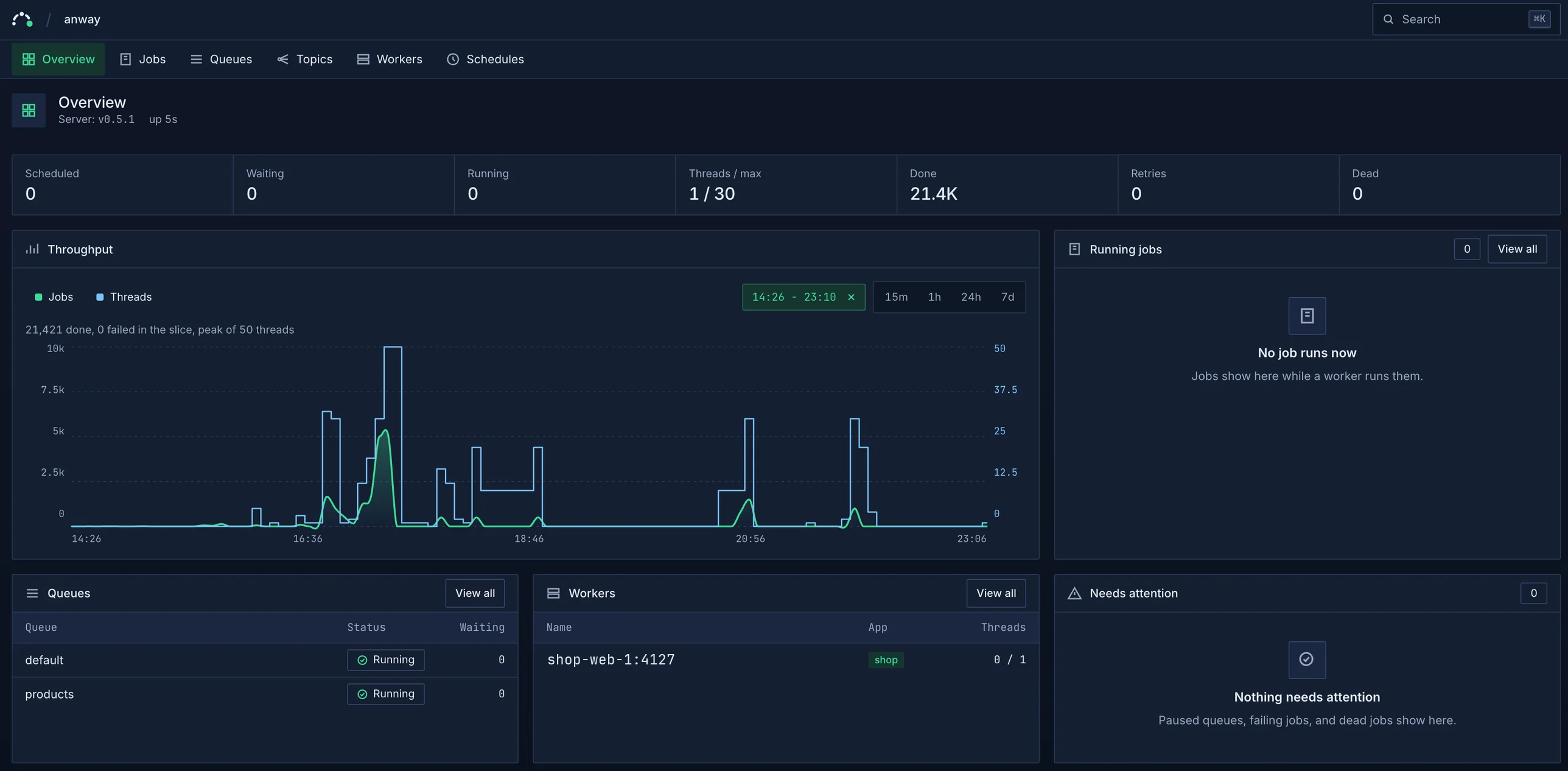
- Throughput and threads on one chart, with a drag to zoom into a time slice
- Queues, workers, topics, and schedules, live as they change
- Retry, delete, pause, and scale from the browser
Tap the image to see it at full size.
Built into the server
Jobs on disk
The server writes each job to disk before it replies OK. A crash or a kill -9 does not lose a job that the server accepted.
Retries and the Dead set
A failed job runs again later, with a longer wait each time. After its last retry it goes to the Dead set, and you can run it again from the console.
Topics
Publish one event, and each subscribed service gets its own copy in its own queue. An event with no subscriber waits in the Dead set.
Thread autoscale
Workers add threads when jobs wait and remove them when the queue is quiet. Set a maximum, or change the count from the console.
Bulk push
Push up to 1,000 jobs with one call and one disk write. Rails perform_all_later uses it.
Web console
See queues, jobs, workers, topics, and throughput as they change. Retry, delete, and scale from the browser.
Start where your app is
Anway speaks the Faktory work protocol, so Faktory clients in other languages connect too.
Inside a Rails app
The gem carries the server for your platform, and bin/dev starts it with Puma. No Redis, and no migrations.
bundle add anwaybin/rails generate anway:installbin/devAs a container
One image for amd64 and arm64. Keep /data on a volume, and set a password before other hosts connect.
docker run -p 7419:7419 -e SERVER_PASSWORD=change-me -v anway-data:/data ghcr.io/thadeu/anwayWith Go or Node.js
Add the client, and set ANWAY_URL to the server address. Workers and pushes use the same URL.
go get github.com/thadeu/anway-gopnpm add @anway/client